
 Eggxpert Review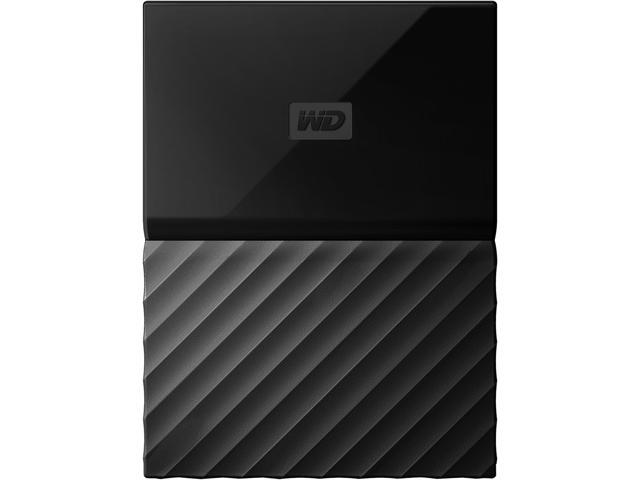
Sẵn hàngBH 36 tháng
Giá chưa gồm VAT 8% · Đã gồm VAT: 11.544.460 ₫ / sản phẩm
| Số lượng | Đơn giá | Tiết kiệm |
|---|---|---|
| 1–2 máy | 10.689.315 ₫ | — |
| 3–9 máy | 10.368.636 ₫ | −3% |
| từ 10 máy | 10.047.956 ₫ | −6% |
Giá trên chưa gồm VAT. Đơn từ 20 máy trở lên hoặc kèm dịch vụ triển khai, gọi 1900 636 106 để có mức riêng.
var ccs_cc_args = ccs_cc_args || []; ccs_cc_args.push([‘mf’,’Western Digital’]); ccs_cc_args.push([‘pn’,’WDBP6A0030BBK-WESN’]); ccs_cc_args.push([‘upcean’, ”]); ccs_cc_args.push([‘lang’, ‘en’]); ccs_cc_args.push([‘market’, ‘US’]); (function () { var o = ccs_cc_args; o.push([‘_SKey’, ‘1b1e8766’]); o.push([‘_ZoneId’, ‘faa3fafd5b’]); var sc = document.createElement(‘script’); sc.type = ‘text/javascript’; sc.async = true; sc.src = (‘https:’ == document.location.protocol ? ‘https://’ : ‘//’) + ‘cdn.cnetcontent.com/jsc/h.js’; var n = document.getElementsByTagName(‘script’)[0]; n.parentNode.insertBefore(sc, n); })();
| Brand | WD |
|---|---|
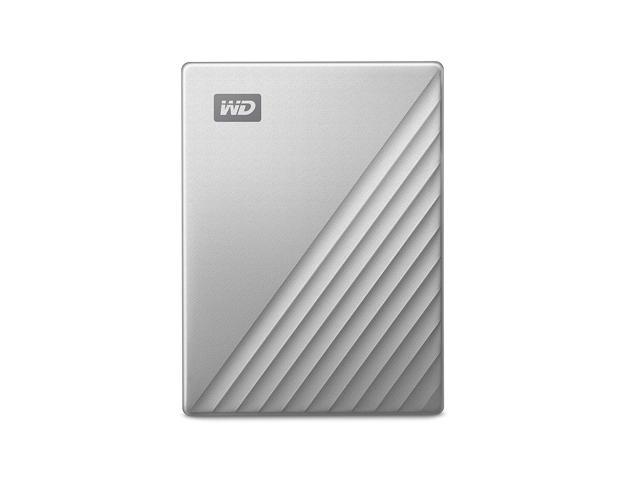
| Series | My Passport for Mac |
| Model | WDBP6A0030BBK-WESN |
| Type | External |
| Capacity | 3TB |
|---|
| Interface | USB 3.0 |
|---|
| System Requirements | Formatted HFS + Journaled Mac OS X Mountain Lion, Mavericks, Yosemite and El Capitan
May require reformatting for other operating systems Compatibility may vary depending on user’s hardware configuration and operating system |
|---|---|
| Features | Designed for Mac My Passport for Mac portable storage works straight out of the box with Mac devices which makes it easy to get going quickly – drag and drop files to and from, or setup a backup routine with Apple’s Time Machine software to help protect your photos, videos, music and documents. Password Protection with Hardware Encryption Reimagined Design Easy to Use |
| Dimensions | 0.85″ x 4.33″ x 3.21″ |
|---|---|
| Weight | 0.37 lb. |
| Package Contents | Portable hard drive USB 3.0 cable WD Backup, WD Security and WD Drive Utilities software Quick install guide |
|---|
| Date First Available | July 07, 2019 |
|---|
Pros: – Arrived quickly from newgg.com. Well packaged item, lots of cushioning.
– 1TB capacity (my MBPr shows 999.83 GB as available).
– Format: Mac OS Extended (Journaled). My MBPr running Sierra immediately recognized this drive. No software install was necessary. I was able to set this drive as Time Machine backup without any additional steps as it is properly formatted right out of the box.
– Once I connected this drive to my MBPr running macOS Sierra, the drive was automatically recognized. No formatting was required for MAC.
– I have also used this drive for Time Machine backup. Again, no formatting was necessary. The drive worked right out of the box for Time Machine
– Standard 18 inch USB 3.0 cable is included.
– Very visible branding indication MAC compatibility. It should be noted that the drive can easily be reformatted to NTFS or exFAT.
– This is a 2.5 inch external, mechanical drive. No additional power cable is needed. The drive receives all the power it needs through its USB 3.0 connection.
– 2 year warranty.
– Includes cable and WD Drive Utilities software. The software includes additional functionalities, including ability to password protect the drive. The installation is optional, the drive was immediately recognized by my MBPr running macOS Sierra.
Cons: – Warranty starts on the date of manufacture, not sale to customer.
– The part of the drive that has WD logo on it, is made from very shiny plastic. It attract fingerprints and smudges easily.
– It is a matter of personal preference, but I don’t like the design of this drive.
Overall Review: My Passport for Mac comes ready for use with Macs out of the box. That includes both storing files and using the drive for Time Machine backups. However, it is not necessary to purchase MAC formatted HD for use with Apple products. Majority of newer external drives can be easily formatted to work with MACs.
– For those wishing to use this drive to store files and for Time Machine backups, the current format is the best.
– If compatibility to work with Windows machines is required, the drive should be formatted to exFAT (you will lose ability to create Time Machine backups).
– WD 1TB My Passport for Mac is a quality hard drive from known and trusted manufacturer.
Pros: Small form factor.
Large capacity.
Worked right out of the box for time machine on my Mac.
There was no setup really necessary to get this drive up and running. It was handed off to my wife who is the primary Mac user in my house. She love the ease of use and always welcomes extra space for backups.
It’s fast for a mechanical drive and had no real problems trying to do large and small file transfers.
It comes with a single usb 3.0 cable that powers the drive.
Cons: It uses a micro USB 3 connector on the drive and is inherently asymmetrical which makes it hard to get in on the first try every time.
It really should have a usb c connector for the drive and either usb c or usb 3 connector for the computer side of the connection at this point in time.
It is still a mechanical hard drive so dropping can cause unwanted damage and you don’t have the silent operation that you get from a ssd let alone the speed.
The drive enclosure itself is a finger print magnet. I was surprised how quickly the drive got completely covered in fingerprints and it was not that easy to get them to come off.
Overall Review: If you’re looking for a cheap backup drive that will reside on you desk in your office or wherever this works. It’s not the fastest but it will work for storing files if something were to happen to your primary computer. If it’s going to travel with you I’d strongly recommend that you look into a ssd external drive.
Pros: If you are reading this, you Macs are known for being expensive on the storage side of things with few options of upgrading storage so external drives are a way of life for most Mac users.
This drive offers a cheap way to offload some of the storage constraints on your Mac without spending a ton of money with decent speed.
+No problems mounting the drive in macOS Sierra
+Decent performance, I was getting 120MB/s sustained read and 100MB/s sustained writes over USB 3.1 connector
+Solid form factor, not too big, not too small. Decent looking package.
Cons: -No Thunderbolt or USB-C!!!! This is almost a deal-breaker. While the speed isn’t beneficial on a standard mechanical drive, the new Macs and MacBook Pros barely have any USB 3.1 Type A connectors or none at all (the big fat connector), making this drive much less useful on the go.
-Too small, 1TB isn’t really worth it for the price. Look for something bigger.
-You’re almost better off getting an SSD-based external even though it will be less storage, it will be much faster.
-micro USB connector on the drive itself is asymmetrical, why do companies do this instead of centering them up?
Overall Review: Between the 1TB storage capacity and the USB Type A connector, this is almost a giveaway type of drive you might put some family movies or pictures on to give to your parents or grandparents.
At least the WD My Passport SSD drive had a clever USB A to C converter and a USB C plug into the drive itself for much better compatibility and speed.
We appreciate your feedback on features of the WD My Passport.
The WD My Passport has been designed considering the latest advancements in performance, reliability, and portability. We recommend more performance demanding users to consider our WD My Passport SSD which comes with a USB 3.1 Type-C port. We placed a link to useful article below for more information.
“My Passport SSD Product Overview (PDF)”: http://products.wdc.com/library/AAG/ENG/4178-707296.pdf
We placed a case number below as a reference, which you can provide to our support teams for assistance.
Case Number: 103117-12433468
Need help? Please contact us at 1 (800) 275-4932.
Pros: Easy to use
Cons: None do far
Pros: Loved the terabyte memory, loved the plug and play ease
Cons: Mine quit two weeks outside the 30-day return … now I have to fight with the manufacturer’s limited warranty.
Overall Review: Overall, I have been well served by WD equipment. Like anything, the WD My Passport for Mac is probably great for as long as it works. If purchased, be sure to add the extended service and data recovery plans.
Thanks for the time providing feedback; it’s always appreciated receiving input from our customers. All our products must pass our stringent quality standards before leaving our factory to be free from defects in materials and craftsmanship.
Please be informed that all the drives are backed with the manufacturer warranty. We stand behind our products throughout the device’s factory warranty period. If you face any difficulty with the replacement of drive then contact us and mention the support case below for assistance.
Case number: 042518-12901455
Need Help? Please contact us at 1 (800) 275-4932