

Sẵn hàngBH 36 tháng
Giá chưa gồm VAT 8% · Đã gồm VAT: 14.038.385 ₫ / sản phẩm
| Số lượng | Đơn giá | Tiết kiệm |
|---|---|---|
| 1–2 máy | 12.998.505 ₫ | — |
| 3–9 máy | 12.608.550 ₫ | −3% |
| từ 10 máy | 12.218.595 ₫ | −6% |
Giá trên chưa gồm VAT. Đơn từ 20 máy trở lên hoặc kèm dịch vụ triển khai, gọi 1900 636 106 để có mức riêng.
var ccs_cc_args = ccs_cc_args || []; ccs_cc_args.push([‘mf’,’Epson’]); ccs_cc_args.push([‘pn’,’C11CJ63202′]); ccs_cc_args.push([‘upcean’, ”]); ccs_cc_args.push([‘lang’, ‘en’]); ccs_cc_args.push([‘market’, ‘US’]); (function () { var o = ccs_cc_args; o.push([‘_SKey’, ‘1b1e8766’]); o.push([‘_ZoneId’, ‘faa3fafd5b’]); var sc = document.createElement(‘script’); sc.type = ‘text/javascript’; sc.async = true; sc.src = (‘https:’ == document.location.protocol ? ‘https://’ : ‘//’) + ‘cdn.cnetcontent.com/jsc/h.js’; var n = document.getElementsByTagName(‘script’)[0]; n.parentNode.insertBefore(sc, n); })();
| Best Seller Ranking | #9 in Inkjet Printers |
|---|
| Brand | EPSON |
|---|---|
| Series | EcoTank |
| Model | C11CJ63202 |
| Recommended Use | MFC / All-In-One |
| Functions | 3-in-1: Print, Copy & Scan |
| Print Technology Print Technology | InkJet |
|---|---|
| Output Type | Color |
| Black Print Speed | Up to 10 ppm |
| Color Print Speed | Up to 10 ppm |
| Black Print Quality | 4800 x 1200 dpi |
| Print Languages, std. | EPSON ESC/P-R |
| Duplex printing Duplex printing | Automatic |
| Copy speed, Black | 7.7 cpm |
|---|---|
| Copy speed, Color | 3.8 cpm |
| Max. Number of Copies | 20 |
| Copy Reduction / Enlargement | 25% – 400% |
| Scan Resolution, Enhanced | 1200 x 2400 dpi |
|---|
| Input Capacity, std. | 100 sheets |
|---|---|
| Output Capacity, std. | 30 sheets |
| Media Type | Envelopes, plain paper, photo paper, glossy paper, matte paper |
| Media sizes supported | 3.5″ x 5″, 8.5″ x 47.2″, A4 (8.25″ x 11.7″), letter size (8.5″ x 11″) |
| USB Ports | Yes |
|---|---|
| Connectivity Technology | Wi-Fi |
| Noise Level (Approx.) | 52 dBA |
|---|---|
| Power Requirements | 120/230VAC, 50-60Hz |
| Power Consumption | 12W |
| Windows Compatible | Windows 7/8/8.1/10 (32-/64-bit) |
|---|---|
| Macintosh Compatible | MacOS 10.6.8-10.15.x |
| Dimensions | 10.20″ x 22.30″ x 14.80″ |
|---|---|
| Weight | 11.90 lbs. |
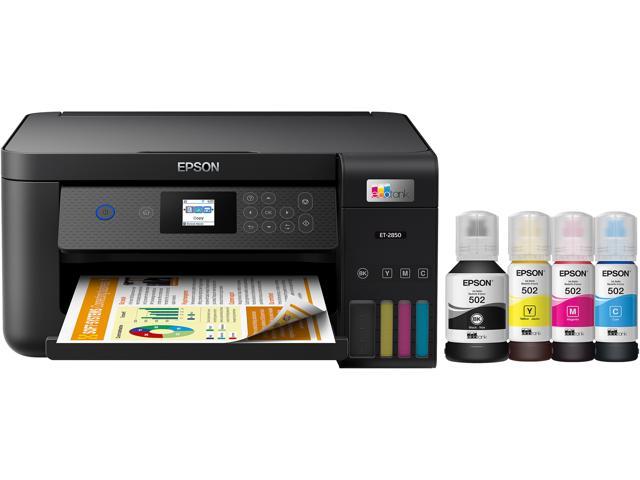
| Package Contents | Epson EcoTank ET-2850 All-in-one Ink bottle (black) Epson 502 Ink bottle (cyan) Epson 502 Ink bottle (magenta) Epson 502 |
|---|
| Date First Available | October 07, 2021 |
|---|
Pros: – Worked almost instantly with a Chromebook, Macbook Pro, Windows PC, and Android phones
– Setup is pretty straight forward
– Print quality seems to be good
Cons: – Instructions for setup do not *exactly* match actual setup (but it’s by no means a deal breaker)
Overall Review: I’m guessing all modern printers are pretty instantaneous in their ability to deal with all devices, but since my last printer was kind of old, it’s super refreshing to be able to easily set up the printer regardless of the device. The Chromebook was the big hassle on my last one (no possible avenue to make it work) but it easily found this printer and immediately was able to print. I set up the printer on the Macbook Pro and once I selected it, all of the options and abilities were just instantly available. My non-techie spouse printed from her Android phone without asking for my help. And I had no problems getting it set up on my Windows machine. Even scanned from it without much hassle.
Haven’t had it long enough to tell how well the ink will last (which is one of the selling points), but print quality seems to be fine on the general use paper we use. On a higher quality paper I’m guessing it would even be nicer. Also, it’s easy to actually see how much ink you have left so there won’t be any “out of ink” surprises. The app does a good job of showing levels as well.
It took a little bit of time to get it setup since you have to fill the reservoirs with ink and it has to prime the pumps that feed the ink to the print heads. Not a big deal, just not a plug it in and go type of device. Also, my spouse didn’t immediately recognize the symbols on the buttons as matching the symbols used in the display screen. So make sure you put your reading glasses on so you can figure out which button makes it copy (hint: it’s the button with the vertical line in the circle.)
Those aren’t criticisms above, just some awareness things. So far, I really like this printer and I would definitely recommend it to others.
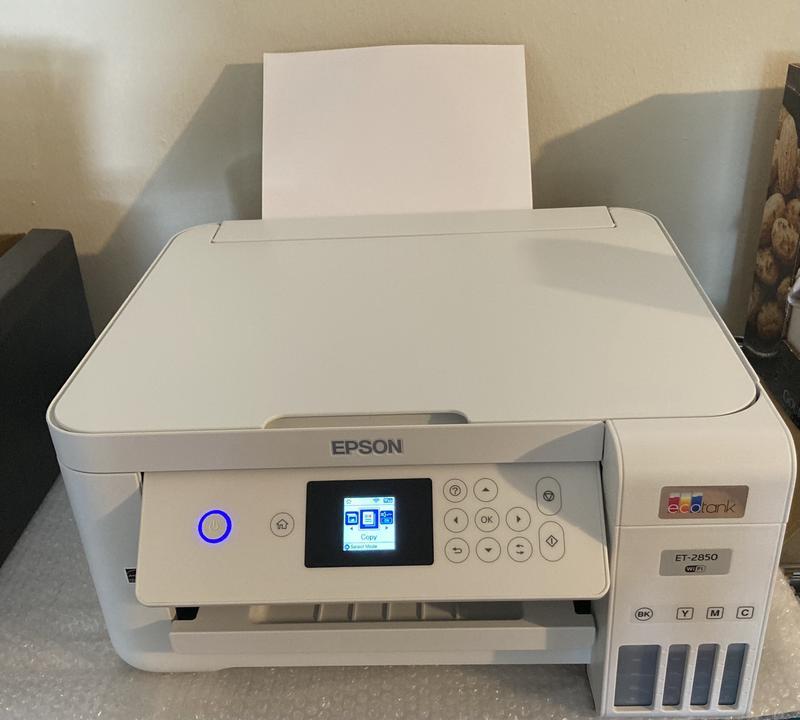
Pros: – The amount of ink is sufficient.
– Lightweight.
– Relative high quality of printings.
– Automatic two-sided printing.
– Wireless printing.
Cons: – The black seems not that black.
– The printing speed for photos is not fast (although I am not in a hurry).
– The page feeder is not automatic.
– Frequent paper jam (maybe due to the paper quality or humidity?)
– The paper becomes a little wet right after printing.
Overall Review: It is a great printer overall with automatic two-sided printing and a large tank of ink. But it does have some disadvantages. Please choose a more advanced model if you care about auto document feeder and printing speed.
Pros: I was disappointed they paper feeds from the top back. I was planning to put it on a shelf with little vertical clearance. I wound up putting it in a less convenient place.
Overall Review: Yes