
Sẵn hàngBH 36 tháng
Giá chưa gồm VAT 8% · Đã gồm VAT: 3.258.193 ₫ / sản phẩm
| Số lượng | Đơn giá | Tiết kiệm |
|---|---|---|
| 1–2 máy | 3.016.845 ₫ | — |
| 3–9 máy | 2.926.340 ₫ | −3% |
| từ 10 máy | 2.835.834 ₫ | −6% |
Giá trên chưa gồm VAT. Đơn từ 20 máy trở lên hoặc kèm dịch vụ triển khai, gọi 1900 636 106 để có mức riêng.
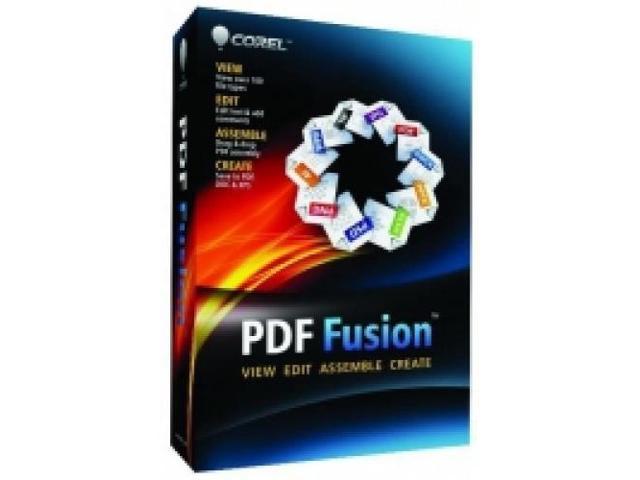
Boost your productivity with Corel PDF Fusion, an all-in-one PDF creator that lets you assemble, edit, and create PDFs. Open more than 100 different file types just by dragging and dropping them onto the Welcome Screen. Take pages from multiple files, including documents, spreadsheets, and presentations, and combine them into a single PDF to share with anyone. Add new text, bookmarks, and comments. Plus, convert files to PDF, PDF/A, XPS, and DOC formats with just a click.
 Assemble new documents with easeDrag and drop to easily add content from multiple sources and file types—including documents, spreadsheets, presentations, and images—into a single PDF document to share with anyone. Quickly assemble new documents using pages from existing material. Export and email PDF documents. Convert to PDF or XPS.
 Open over 100 file typesOpen over 100 file types—even if you don’t have the software used to create the file! Open Microsoft Word, Microsoft Excel, Microsoft PowerPoint, Adobe Photoshop, Microsoft Visio, and other popular file types. Choose from Page, Assembly, or Flick views to work with your document.
 Edit and rearrange contentJust select a line of text, and start typing to make changes. Edit or add text anywhere in a document. Easily add bookmarks and comments. Mark up documents using highlighting and sticky notes. Redact sensitive information and save securely. Add watermarks. Insert hyperlinks to other pages in your document, other files, or websites. Rearrange, rotate, or crop pages.
 Create files in PDF, DOC, and XPS formatsCreate new PDF documents from within any application that can print. Organize and send related files in a single PDF document. Convert multiple files at once with the Corel PDF Batch Converter.
var wcCpi = ‘N82E16832106238’;
| Brand | Corel |
|---|---|
| Model | 735163132670 |
| Type |
| Name | PDF Fusion |
|---|---|
| Operating Systems Supported Operating Systems Supported | Windows |
| Packaging Packaging | Retail |
| System Requirements | Microsoft Windows 7, Windows Vista or Windows XP with latest service packs installed (32-bit and 64-bit editions) 512 MB of RAM (1 GB recommended) 250 MB of available hard disk space 1.3 GHz or faster processor 1,024 x 768 screen resolution |
| Feature | View over 100 file types – Open over 100 file types—even if you don’t have the software used to create the file! – Open Microsoft Word, Microsoft Excel, Microsoft PowerPoint, Microsoft Project, Adobe Illustrator, Adobe Photoshop, Microsoft Visio and many other file types – Choose from Page, Assembly or Flick views to work with your document Edit and rearrange content Assemble new documents with ease Create files in PDF, DOC and XPS formats |
|---|
| Date First Available | February 12, 2021 |
|---|
Do you own this product?